WINDOWS SECURITY LAYER FOR AI CODING AGENTS
Phylax stops agents before they touch your private files.
User-mode Windows ACL enforcement. DENY ACEs + Mandatory Integrity Control labels. Phase 1 — kernel minifilter driver in development.
100% local · No accounts · No cloud · No telemetry
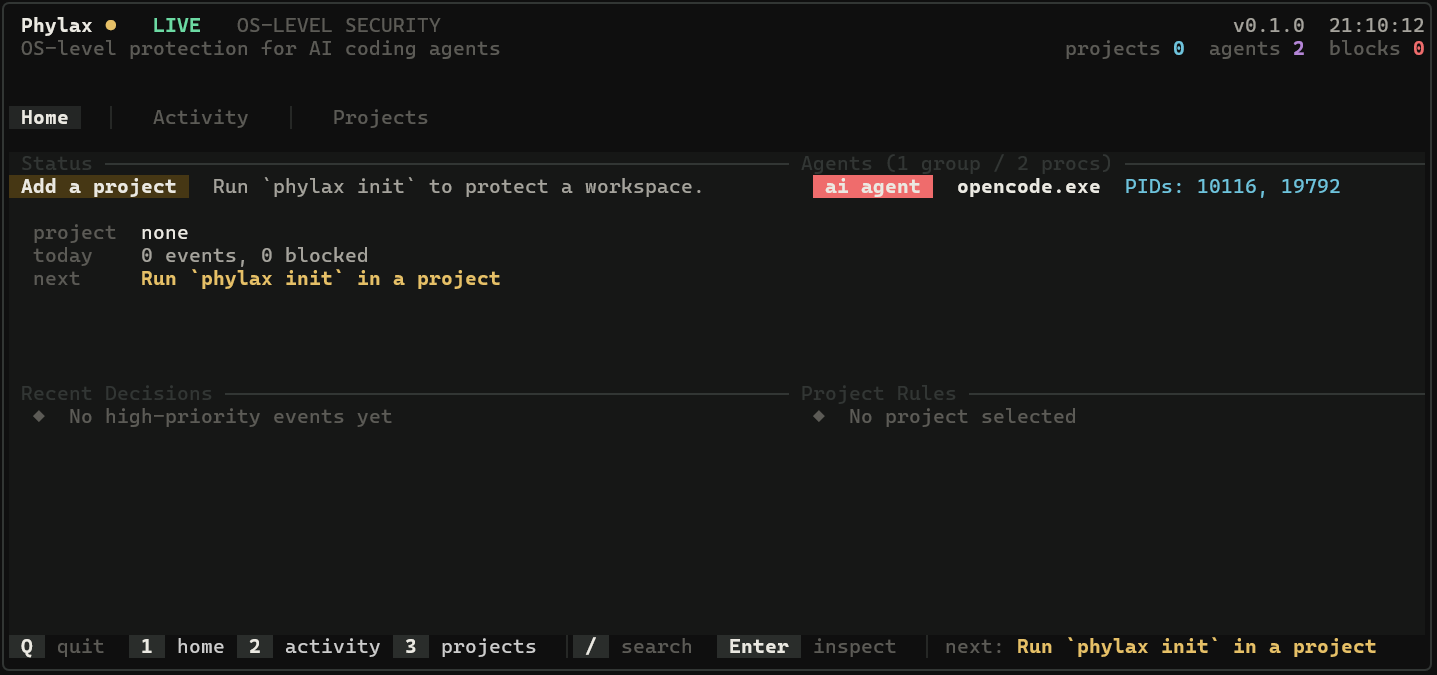 Phylax ● LIVE
 Why Phylax
The problem is real. The solution is local.
AI agents like Claude Code, Cursor, and OpenCode have full filesystem access. They can read, write, or delete anything.
Phylax puts a real OS-level boundary between them and your secrets. No proxy, no wrapper. The kernel enforces it.
100% Local
No account, no cloud, no telemetry. Everything stays on your machine. Audit logs in local SQLite. Works fully offline.
Multi-Agent Detection
Recognizes Claude, Cursor, OpenCode, Copilot, Windsurf, Aider, and more. Detects agents by process name, environment variables, and child inheritance.
OS-level Enforcement
Applies real Windows ACLs (DENY ACEs + Mandatory Integrity Control). The kernel itself returns ACCESS_DENIED - the agent never touches the file.
Phylax applies three layers of Windows security to every denied file: DENY ACEs for read/write/delete, WRITE_DAC protection for ACL modification, and Mandatory Integrity Control to stop privilege bypass.
How it works
Three steps. Zero cloud.
No cloud proxy, no API keys, no network required. Everything runs locally on your machine.
Detect
Identifies AI agent processes by image name, environment variables, and command-line inspection. Child processes inherit the agent label automatically.
Decide
Checks your phylax.toml rules against the file path and operation. Deny always wins. Priority-ordered buckets resolve every access attempt.
Block
Applies real Windows ACLs. The kernel returns ACCESS_DENIED before the agent touches a single byte. No userspace trick can bypass it.
Real example
A real example.
This is what happens when an AI agent tries to access a protected file.
Three layers of Windows security: DENY ACEs block file access, WRITE_DAC prevents ACL modification, and Mandatory Integrity Control stops privilege bypass. The kernel returns ACCESS_DENIED, the agent never sees a single byte.
Policies
Choose your protection level.
Phylax uses six permission buckets ordered by priority. Deny always wins. Start with a preset, then customize via phylax.toml.
Conservative default When no rule matches: read = Allow, write = Ask, delete = Deny.
Recommended
Protects secrets and critical files. Source edits are fast. Lockfile changes ask for confirmation.
Blocks .env, .pem, .key. Allows src/** and tests/**. Prompts for migrations and lockfiles.
[project]
name = "my-phylax-project"
default = "conservative"

[deny]
files = [".env", ".env.*", "secrets/**", "*.pem", "*.key", "phylax.toml"]

[ask]
files = ["Cargo.lock", "package-lock.json", "migrations/**"]

[write]
files = ["src/**", "tests/**", "docs/**"]

[read]
files = ["README.md", "docs/**"]Strict
Maximum security. Every source edit and lockfile change requires explicit approval.
Denies .env, .pem, .key, .p12, .pfx, secrets/**. Asks for every source edit. Read-only by default.
[project]
name = "phylax-strict"
default = "conservative"

[deny]
files = [".env", ".env.*", "secrets/**", "keys/**", "*.pem", "*.key", "*.p12", "phylax.toml"]

[ask]
files = ["src/**", "tests/**", "Cargo.lock", "package-lock.json", "migrations/**"]

[read]
files = ["README.md", "docs/**", "src/**", "tests/**"]Fast & Flexible
Lets agents edit freely. Only secrets and the manifest are protected.
Blocks .env, .pem, .key, phylax.toml. Everything else is writable. No prompts for normal edits.
[project]
name = "phylax-fast"
default = "conservative"

[deny]
files = [".env", ".env.*", "secrets/**", "*.pem", "*.key", "phylax.toml"]

[write]
files = ["src/**", "tests/**", "docs/**", "examples/**", "Cargo.lock", "package-lock.json"]

[read]
files = ["README.md", "docs/**", "src/**", "tests/**", "examples/**"]Security Status
Phase 1 limitations & transparency
Phylax is under active development. Phase 1 provides real protection, but understanding its boundaries is essential before relying on it.
- Blocks read, write, and delete operations on files matching
[deny]patterns - Applies real Windows DENY ACEs enforced by the kernel at ring 3
- Three-layer anti-bypass: DENY ACEs + WRITE_DAC + MIC labels (High Integrity)
- Detects 9 AI agents via 5 priority-ordered signals
- All audit events stored in local SQLite
- Zero network requests — runs fully offline
- Protection is active while the daemon runs.
phylax stopremoves DENY ACEs - DENY ACEs apply to Everyone (including you). Stop the daemon to edit protected files
- ~750ms polling window between agent detection and ACE application
- Audit logs in SQLite are user-writable — an agent with filesystem access could modify them
- Killing the daemon process removes all protection
- No per-agent differentiation yet (Phase 2)
The kernel minifilter driver (driver/phylax.sys) will provide: agent-only blocking (you keep access), IRP-level interception with zero polling delay, protection that survives daemon restart, tamper-proof kernel audit, and per-agent overrides.
| Feature | Phase 1 (Current) | Phase 2 (In Dev) |
|---|---|---|
| Enforcement | Windows ACLs (user-mode) | Kernel I/O IRP interception (ring 0) |
| Protection on daemon stop | Removed | Persists (driver stays loaded) |
| Agent vs human distinction | No (blocks Everyone) | Yes (PID-based resolution) |
| Detection latency | ~750ms polling | Zero (kernel callbacks + ETW) |
| Audit integrity | User-writable SQLite | Kernel-level, tamper-proof |
| Bypass via killing daemon | Possible | Blocked (driver persists) |
| Ask flow enforcement | Not enforceable | IRP paused, waits for user |
| Per-agent overrides | Stored, not evaluated | Active per-agent policy |
Transparency note: This page exists so you can make an informed decision. No software is bug-free. If you find a vulnerability, please report it responsibly.
Install
Inspect the source first. Then install.
Read the code. Verify the checksum. Understand what you're running. No accounts, no cloud, no telemetry.
1. Inspect the installer script on GitHub — it's a single PowerShell file.
2. Verify the checksum before execution:
# SHA256 of install.ps1
Get-FileHash install.ps1 -Algorithm SHA256
Checksums are published with each GitHub release.
Prefer to compile yourself? No problem.
git clone https://github.com/TheUser99-spec/Phylax.git
cd Phylax
cargo build --workspace --release
Requires Rust toolchain. The compiled binary will be in target/release/.
phylax init Creates phylax.toml and starts the daemon phylax run Daemon + live terminal dashboard (60fps) phylax stop Stops daemon and releases file locks phylax status Live view: projects, agents, events, blocks